
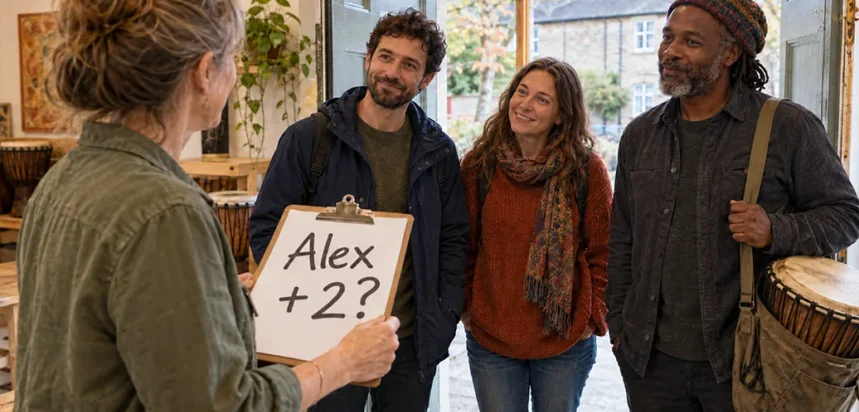
You know how many people are coming. Here’s how to get the details right.
Three people are booked onto your Saturday workshop. You’ve got a contact name, an email address and the bookings in your calendar.
Then you start getting things ready.
Does everyone need equipment? Has anyone done this before? And is the person whose name you’ve got actually coming, or have they booked for somebody else?
You send an email. The reply gives you everything you need for two people, but says nothing about the third. You send another email...
It’s a small job, but a familiar one. Repeat it across a week’s worth of bookings and those quick emails, replies and reminders become a sizeable amount of work. The bookings are in, but you’re still gathering the information you need to run the sessions.
For businesses offering classes, workshops, courses, event bookings and appointments, getting those details right makes a practical difference. It helps staff prepare, gives customers fewer loose ends to deal with and saves the organiser from piecing everything together as they prepare.
The person booking isn’t always the person attending
A parent booking a class for their child is an obvious example. You need the parent’s contact details, but it’s the child’s name you need on the class list.
The same distinction crops up when a colleague organises a team workshop, someone books an appointment for a relative, or one friend sorts out an activity for the group.
There are two roles here. The booker makes the booking. The attendee is the person taking part. Sometimes they’re the same person; sometimes they aren’t.
Keeping those roles clear helps everyone. A parent shouldn’t have to wonder whose date of birth they need to enter on the booking form. Your staff shouldn’t have to work out whether the name in front of them belongs to the child they’re expecting or the adult who paid.
Jezzam’s Attendee Management collects the details you need for the booker and each attendee. Booking and order emails, including updates, go to the booker, keeping the person arranging everything in the loop while your team knows who’s actually taking part.
Ask the right questions. Lose the questionnaire.
Once you start thinking about what would be useful to know, it’s tempting to keep adding questions.
Experience level. Equipment requirements. Dietary preferences. Where someone heard about you. Whether they’ve visited before.
Some of those answers might help you deliver the activity. Others might simply be interesting to have. Customers still have to work through all of them.
There’s a reason to be selective. Baymard Institute’s checkout research reported that 17% of users had abandoned a purchase because checkout was too long or complicated. That figure concerns ecommerce rather than online bookings, but it illustrates the risk of giving customers too much work before they finish.
That’s even more relevant when someone is booking for several people. Every unnecessary attendee question becomes something they have to answer several times.
Nielsen Norman Group adds a useful point in its guidance on simplifying forms: reducing the number of questions is only part of the job. The questions you keep should also be easy to answer.
Sometimes that means a simple yes or no. Sometimes it’s a choice from a list, or a few words of explanation. A good booking form gives you the flexibility to ask each question in a way that suits the answer and keeps things easy for the person booking.
The aim is to collect enough information to prepare, without making booking feel like hard work. Every question should have a purpose, and answering it should be straightforward.
So how do you decide what earns its place?
What will you do with the answer?
Try finishing this sentence for each question:
“We need this answer so that we…”
For an African drumming workshop, that might mean:
- Does each person need a drum? We need this answer so that we have the right equipment ready.
- How much drumming experience does each person have? We need this answer so that we prepare the workshop at a suitable level.
- Does anyone have access or seating requirements? We need this answer so that we make suitable arrangements before people arrive.
Each answer leads to a practical decision. If you struggle to finish the sentence, consider whether the question needs to be there. It’s a useful test for forms that have gradually grown as different people have added things they thought might come in handy.
To find useful questions you might be missing, look through your follow-up emails. If you regularly ask customers whether they need equipment or what experience they have, those questions probably belong on the booking form.
GOV.UK’s guidance on structuring forms takes a similar approach: establish why you need each piece of information, what you’ll do with it and who needs to provide it.
That doesn’t mean every question has to be essential to running the activity. “How did you hear about us?” might be perfectly reasonable on a short form. But as the questions add up, give priority to the answers you need to deliver the service or activity.
It’s all about balance: collect what’s useful to your business while keeping the booking process quick and simple.
Some details belong to the person. Others belong to the occasion.
There’s another distinction worth making before you build the form.
A date of birth is information about a person. So is a dietary preference that applies whenever they visit. In Jezzam, these are customer fields, configured for the booker, the attendee or both, depending on whose information you need.
“Would you like lunch at this workshop?” is different. Someone might want lunch this time and bring their own next time. “Will you be bringing a drum?” also relates to that particular session.
These are booking fields. They collect information for the occasion, either for each attendee or for the booking as a whole. A room booking, for example, might ask how the customer wants the furniture arranged.
You don’t need to turn this into a complicated exercise. Think about what you’re asking for:
- General details about the booker or attendee, such as their date of birth.
- Information about each attendee for this particular booking, such as their lunch choice.
- Information about the booking as a whole, such as how the room should be arranged.
That helps you put the question in the right place.
Jezzam’s field settings let you choose who or what each question relates to. Customer fields appear alongside the appropriate booker or attendee details on the booking form.
The booking form designer lets you build different forms for different services and activities. It groups whole-booking questions and attendee questions separately, ready for you to arrange them.
Make the answers easy to give
Suppose Alex books an African drumming workshop for Alex, Jamie and Taylor.
You need to know whether each person requires a drum or is bringing their own. A general text box on your booking form would need Alex to write an explanation, remember to cover everyone and make clear which answer belongs to which person.
A short question for each attendee is more straightforward: “Do you need a drum for this session?” with two answers to choose from: “I need a drum provided” or “I’m bringing my own”.
There’s evidence that clarity makes a difference beyond simply shortening forms. Researchers at Google and the University of Basel improved a selection of online forms, making changes such as explaining answer requirements in advance, distinguishing required and optional fields, and placing error messages beside the questions that needed attention.
They then tested the original and improved versions. People completed the improved forms faster, were more likely to submit them successfully on their first attempt and reported greater satisfaction.
For your booking form, it’s worth checking more than the number of questions. Do customers understand what each one means, whether they need to answer it and what information to provide?
Jezzam supports dropdown lists, single-choice and multiple-choice questions, checkboxes, dates and text boxes. Choose the format that suits the answer and decide whether a response is required or optional. A lunch choice might need a dropdown. An access requirement may need a text box so the person has room to explain.
Keep the wording short and specific. Where a question needs explanation, Jezzam also lets you add help text to guide customers as they fill in the form.
Different activities need different questions. Equipment requirements for a drumming workshop won’t necessarily help you prepare for a business consultation.
With customisable booking forms, you assign booking questions to the activities where they’re relevant. Customers see appropriate questions for what they’re booking, and your team gets information suited to the work ahead.
An answer needs somewhere useful to live
If you’ve ever collected extra booking details through follow-up emails, phone calls and separate forms, you’ll know how scattered the answers become.
The original names are on the booking list. An equipment request arrives by email. Someone adds a lunch choice to a spreadsheet, while a colleague writes down a seating request after a phone call.
Before your customers arrive, somebody has to bring it all together. That means checking messages, comparing lists and making sure everyone involved has the latest details.
Collecting attendee information through Jezzam keeps it together with your booking records. Staff open the relevant booking from the Admin Calendar or the Customers section to view the information collected.
Centralised reports also help when you need a wider view. For example, filter a report to the relevant events or services and choose which booking fields to include. That brings the answers together across bookings, with an Excel export available if you need a spreadsheet for preparation or further work.
When it’s time to prepare, the details are all in one place. You’re checking what’s needed for the bookings ahead, rather than searching emails and comparing lists to piece the answers together.
Do you need Attendee Management?
You don’t have to switch Attendee Management on. If customers normally book for themselves and you don’t need separate booker and attendee details, leave it off. Jezzam treats the person booking as the person attending and keeps the booking journey simple.
If people regularly book for children, colleagues or friends, switching Attendee Management on will help you collect the right details for everyone, whether the person arranging the booking is taking part too or simply organising it for others.
To decide whether it would help your business, look at a few recent bookings made on somebody else’s behalf. Did you need the child’s age as well as the parent’s contact details? Did a group organiser have to send you everyone’s equipment requirements afterwards? Those are situations where separate booker and attendee questions make sense.
Start with the details you genuinely need, give each question a clear purpose and make the answers easy to provide.
Be ready for the people arriving
For a small business owner, the benefit of Attendee Management reaches beyond a tidier booking record. It means fewer follow-up messages between other jobs, less time checking separate lists and better information for the people delivering the service.
Customers benefit from that preparation, too. The right equipment is ready. A seating request has reached the instructor. A parent arrives to find their child expected by name.
Those are small things, but they shape how it feels to visit your business. Getting the details right during booking gives your team more time to welcome people and look after them when they arrive.
Explore Jezzam Attendee Management, or follow the setup guide to get started.
We’d love to hear how your customers book, and whether there’s anything that would make the process easier for them or for you.