
You’ve finally got your diary in front of you. You want to book a couple of appointments, perhaps a class too, and get it all sorted before something else needs your attention.
You choose the first appointment, fill in the details and check out. Then you go back to the beginning to do it all again.
It’s a familiar bit of online booking faff.
Now imagine your customers having to do the same thing when they want to book several appointments or activities with your business. They’re ready to book, but each additional booking means going through checkout all over again.
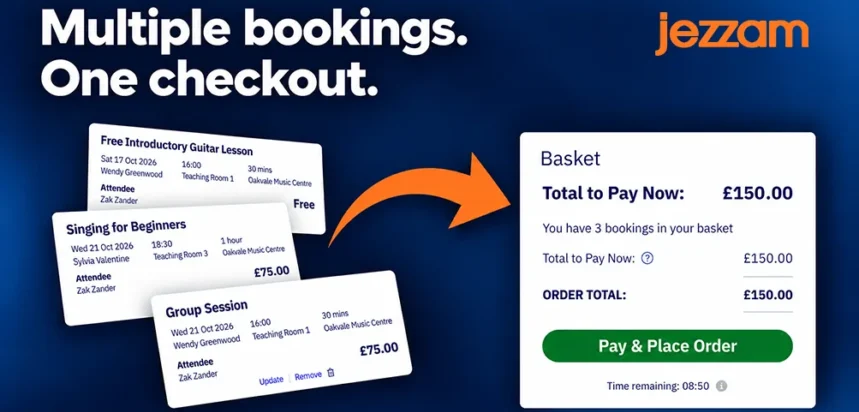
That’s where Jezzam’s baskets and orders come in. Customers can make multiple bookings, check their choices together and complete one checkout. Behind the scenes, you get an order that brings those bookings together while keeping each one individually manageable.
Ready to book shouldn’t mean ready to repeat yourself
Think about a parent organising activities for two children, or a regular customer booking their next four appointments. They’ve already decided they want to book. The job of the booking page is to help them get it done.
But even when someone is ready to book, a frustrating checkout process can put them off. Baymard Institute reports that 17% of US online shoppers have abandoned an order because checkout was too long or complicated. That research looks specifically at online shopping, rather than appointments or classes, but it’s a useful reminder that people’s willingness to work through a checkout has its limits. See Baymard’s checkout abandonment findings.
A basket won’t solve every reason someone leaves without booking. It does, however, remove the need to complete a separate checkout for every appointment or activity they choose.
Give people less to do, not just fewer pages
Another important part of making checkout easier is how much information customers have to enter. Baymard's research into checkout forms found that the number of fields people have to complete matters more to usability than the number of checkout steps.
Of course, with bookings, some information is essential. You might need details about each appointment or each person attending. Those questions still need answering, even when someone is booking several things together.
The aim is to collect the information you need without making customers do unnecessary work.
With Jezzam, customers can add several bookings to a basket and check out once when they're ready. Four appointments means one checkout, not four.
The same goes for classes and events. If someone wants to book three places on a workshop, they can choose all three together rather than going through checkout separately for each person.
And if they only want to make one booking? They can go straight through checkout as usual.
A chance to check everything before checkout
Suppose you’re booking a Saturday morning activity for one child and an afternoon workshop for another. Before confirming, you’ll probably want to check the times, the places and what you need to pay.
Your customers need that same opportunity. Jezzam's basket brings their choices together so they can review the details, amend a booking or remove something before checkout.
There’s a sound usability principle behind this. Nielsen Norman Group recommends reducing the information people have to hold in their heads while using a website. For someone juggling several bookings, seeing their choices together saves them having to remember everything they’ve selected.
So where do orders fit in?
The basket is where customers collect their choices. When they complete checkout, Jezzam creates an order containing the bookings.
Each appointment and each place on an event or class remains an individual booking, with its own date, time, status and payment details. The order simply keeps a record of what was booked together.
And that really helps when something changes. If a customer needs to move one appointment, you can deal with that booking on its own. The other bookings remain part of the same order.
You can also find out more about how bookings and orders work together in our guide to bookings, orders and baskets.
Different bookings keep their own rules
Of course, sometimes a customer might want to book a few things that have different payment options. For example, some need paying for straight away, some are paid later, and others are free.
Let’s say they book a workshop that needs paying for straight away, a free event and an appointment they’ll pay for later. They add all three to Jezzam’s booking basket. Jezzam automatically works out what needs to be paid now and what can be paid later. The customer only pays what's due at checkout, and Jezzam creates one order containing all three bookings, each with its own payment arrangements.
When bookings have different payment options, you need a clear picture of the totals, what’s been paid and what’s still due. Jezzam keeps track of that for you. You’ll find more about how it works in our guide to order totals and payment summaries.
The same applies to booking status. One booking might be confirmed immediately while another needs your approval or is pencilled in. Putting them in one order doesn’t force them all to follow the same workflow.
If you offer a mixture of appointments, classes and events, you shouldn’t have to change how you run them just so customers can book them together. Jezzam keeps each booking’s payment options and workflow intact, while bringing everything into one order.
“It’s about the bookings I made on Tuesday…”
Customers often remember the occasion when they booked, rather than a particular booking reference. Perhaps they sat down on Tuesday evening and arranged the next few weeks.
Having an order gives you a way into that conversation. In the customer’s Orders tab, you can see what they booked together, review the totals and payment status, and open whichever booking needs attention. Of course, you can still search on order or booking reference if you need to!
You can also resend the order email if they need an up-to-date summary. It gives you the wider picture without losing the detail of an individual appointment or class place. See how to view and manage customer orders.
Keeping customers in the loop
Booking several things together shouldn’t leave customers hunting through a flurry of initial confirmations. Jezzam sends one main order email with all the details of the bookings they’ve made.
After that, messages focus on what has changed. If one appointment is rescheduled or one booking is approved, the customer receives an update about that booking. There’s no need to repeat the whole order email every time.
So, it’s one email for the order, then updates about individual bookings as needed. Our guide to order-based emails takes a closer look at how order confirmations and individual booking updates work together.
Customers also have a way to check their latest booking details online. They can follow the “View your order” link in their order email or the “View your booking” link in individual booking emails. For guest bookers, Jezzam provides an extra layer of security by sending a one-time verification code to their email address, which they enter to confirm their identity before accessing their booking details.
Customers with a User Profile can also look up their bookings and orders directly from their profile.
So customers get their booking details together, hear about changes as they happen and have somewhere to check the latest information. It keeps them informed without filling their inbox with the same details over and over.
And who’s actually coming?
Sometimes, the details of the person booking and the number of places they’ve reserved are all you need. But if they’re booking for children or friends, you might also need to know who’s coming and collect some information about each person.
That’s where Jezzam’s optional Attendee Management feature helps. It lets you collect details about the person making the booking and each person attending, including names, standard booking information and answers to any custom questions you might need.
For an organiser, the benefit is having those details collected during booking, rather than having to ask afterwards who each place is for. Our Attendee Management setup guide shows you how to get started.
Have a look at it in action
Our multiple bookings, baskets and orders video follows a customer from their first selection through the basket and checkout, then takes a look at the finished order in the admin panel.
Want to give it a go? Try Jezzam free for 30 days and see how it works for your business.
We’d love to hear how your customers book, and whether there’s anything that would make the process easier for them or for you.